

Installation packages
Dragon Medical One is an enterprise level productivity application that provides full support for local desktop installations as well as virtual deployments. Dragon Medical One needs to run in the same process space as the target application. If the target application is installed locally, Dragon Medical One should also be installed locally. Likewise, if the target application is deployed virtually, Dragon Medical One needs to be deployed virtually as well.
Local installation
Dragon Medical One can be installed by clinicians directly on their computers using the ClickOnce installation link that is provided in your Welcome Kit. The ClickOnce deployment does not require elevated user rights and provides automatic upgrades when new versions are released by Nuance. If you prefer to control deployment to the local workstation, you can use the MSI package below to perform an SMS push installation.
Virtual deployment
Dragon Medical One can be published as a virtual application or installed as part of a virtual desktop image. For virtual deployments, we recommend the XCOPY deployment package below. For more information on how to deploy your application in a virtual environment see: Virtual environment support.
Installationspakete
Dragon Medical One ist eine für Unternehmen entwickelte Lösung zur Produktivitätssteigerung, die sowohl für lokale Desktopinstallationen als auch virtuelle Umgebungen vollständige Unterstützung bietet. Dragon Medical One und die Zielanwendung dürfen nicht in unterschiedlichen Prozessbereichen ausgeführt werden. Wenn die Zielanwendung lokal installiert ist, muss auch Dragon Medical One lokal installiert sein. Wenn die Zielanwendung virtuell bereitgestellt wird, muss auch Dragon Medical One virtuell bereitgestellt werden.
Lokale Installation
Dragon Medical One kann von medizinischen Fachkräften direkt auf deren Computern installiert werden; dies geschieht mithilfe des Links für die ClickOnce-Installation, der in Ihrem Welcome Kit enthalten ist. Die ClickOnce-Bereitstellung erfordert keine erweiterten Benutzerrechte; wenn Nuance eine neue Version veröffentlicht, wird automatisch ein Upgrade durchgeführt. Wenn Sie die Bereitstellung auf lokalen Arbeitsstationen steuern wollen, können Sie mit dem unten bereitgestellten MSI-Paket eine Installation per SMS-Push durchführen.
Virtuelle Bereitstellung
Dragon Medical One kann als virtuelle Anwendung veröffentlicht oder als Teil eines virtuellen Desktop-Image installiert werden. Für virtuelle Bereitstellungen empfehlen wir das Paket der XCOPY-Bereitstellung weiter unten. Informationen dazu, wie Sie Ihre Anwendung in einer virtuellen Umgebung bereitstellen, erhalten Sie in: Unterstützung für virtuelle Umgebungen
XCOPY deployment package 2021.4.5 (v21.4.118.2236)
In larger systems and virtual deployments, the XCOPY installation package enables you to deploy Dragon Medical One using simple file copy operations. You can customize the application flexibly by editing the application configuration file; for more information, see the Anleitung zur Installation und AdministrationInstallation and Administration Guide.
For more information on how to deploy your application in a virtual environment see: Virtual environment support.
Note: Depending on your Group Policy security settings, Windows might mark downloaded files as unsafe. Unblock the .zip file, if necessary, to allow proper execution of Dragon Medical One when started: Right-click the .zip file and select Properties; on the General tab, click Unblock and Apply.
MSI deployment package 2021.4.5 (v21.4.118.2236)
The Windows Installer package is MSI command line-only; no installation wizard is available. For information on mandatory and optional parameters, see the Anleitung zur Installation und AdministrationInstallation and Administration Guide. To control deployment to users' local workstations across your system, you can use the MSI package to perform an SMS push installation.
 Download MSI package
XCOPY-Bereitstellungspaket 2021.4.5 (v21.4.118.2236)
In größeren Systemen und virtuellen Umgebungen ermöglicht das XCOPY-Installationspaket die Bereitstellung von Dragon Medical One mittels einfacher Dateikopiervorgänge. Durch Bearbeiten der Konfigurationsdatei können Sie die Anwendung flexibel anpassen; weitere Informationen erhalten Sie in Anleitung zur Installation und AdministrationInstallation and Administration Guide.
Informationen dazu, wie Sie Ihre Anwendung in einer virtuellen Umgebung bereitstellen, erhalten Sie in: Unterstützung für virtuelle Umgebungen
Hinweis: Abhängig von Ihren Sicherheitseinstellungen bzgl. der Gruppenrichtlinie werden heruntergeladene Dateien von Windows möglicherweise als unsicher gekennzeichnet. Falls erforderlich, heben Sie die Blockierung der heruntergeladenen .zip-Datei auf, damit Dragon Medical One beim Starten korrekt ausgeführt werden kann: Klicken Sie die .zip-Datei mit der rechten Maustaste und wählen Sie Eigenschaften aus; auf der Registerkarte 'Allgemein' klicken Sie Nicht mehr blocken und Übernehmen.
MSI-Bereitstellungspaket 2021.4.5 (v21.4.118.2236)
Das Windows Installer Paket kann nur mittels MSI-Befehlszeile verwendet werden; es ist kein Installationsassistent verfügbar. Informationen zu den erforderlichen und optionalen Parametern erhalten Sie in Anleitung zur Installation und AdministrationInstallation and Administration Guide. Wenn Sie die Bereitstellung auf lokalen Arbeitsstationen steuern wollen, können Sie mit dem unten bereitgestellten MSI-Paket eine Installation per SMS-Push durchführen.
Virtual environment support
Dragon Medical One was built from the ground up as a pure virtual application to allow for rapid deployment and help ease the burden on overworked IT staff. For doctors to dictate from an endpoint, you may need to install vendor-specific microphone and audio compression extensions.
Benefits
The Nuance custom audio channel significantly reduces the bandwidth requirements for audio transmission from the client end point to the virtual application. Nuance provides custom audio channel implementations for Citrix, VMware and RDS.
These custom audio channels are automatically installed on the server when you deploy the main Dragon Medical One application. The client components of the extensions still need to be installed on the client PC using the installation packages below.
For more information on the available audio solutions for your configuration, see Audio Routing Solutions in Virtualized Environments.
Compatibility
The Nuance virtual extensions are designed to be backward compatible from Dragon Medical One to the client end point. This means you can run newer versions of Dragon Medical One in your virtual environment and they will be compatible with older versions of their corresponding client end point extension. The following recommendations and restrictions apply:
- Compatibility for up to one year: New versions of Dragon Medical One are backward compatible with the corresponding end point virtual extensions for up to a year.
- Best practice (end point): We recommend that you update your client end point extension as soon as possible to benefit from fixes and optimizations applied to the extensions.
Unterstützung für virtuelle Umgebungen
Dragon Medical One wurde von Grund auf als eine rein virtuelle Anwendung konzeptioniert, die eine möglichst schnelle Bereitstellung ermöglicht und keine zusätzliche Arbeit für das IT-Personal bedeutet. Damit Ärztinnen und Ärzte von einem Endpunkt aus diktieren können, müssen Sie möglicherweise herstellerspezifische Mikrofone und Erweiterungen für die Audiokomprimierung installieren.
Vorteile
Der von Nuance entwickelte Audiokanal reduziert die Bandbreitenanforderungen für die Audio-Übertragung zwischen dem Client-Endpunkt und der virtualisierten Anwendung ganz erheblich. Nuance bietet eigene Audiokanal-Implementierungen für Citrix, VMware und RDS.
Diese eigens entwickelten Audiokanäle werden automatisch auf dem Server installiert, wenn Sie die Hauptanwendung von Dragon Medical One bereitstellen. Die Client-Komponenten der Extensions müssen jedoch noch auf dem Client-PC installiert werden; verwenden Sie dafür die unten angeführten Installationspakete.
Weitere Informationen zu den Audiolösungen, die für Ihre Konfiguration verfügbar sind, erhalten Sie in Audio Routing Solutions in Virtualized Environments.
Kompatibilität
Die Nuance Virtual Extensions wurden so entwickelt, dass sie von Dragon Medical One zum Client-Endpunkt abwärts kompatibel sind. Das bedeutet, dass Sie in Ihrer virtuellen Umgebung neuere Versionen von Dragon Medical One ausführen können und diese mit den älteren Versionen der entsprechenden Client-Endpunkt-Extension kompatibel sind. Dabei gelten folgende Empfehlungen und Einschränkungen:
- Kompatibilität von bis zu einem Jahr: Die Abwärtskompatibilität neuer Versionen von Dragon Medical One mit den entsprechenden älteren Versionen am Endpunkt ist auf ein Jahr begrenzt.
- Best Practice (Endpunkt): Wir empfehlen, die Extension auf dem Client-Endpunkt möglichst bald auf die neueste Version zu aktualisieren, um von den entsprechenden Problembehebungen und Verbesserungen profitieren zu können.
Nuance Citrix extensions v121.4.227.2318: The Nuance Citrix extensions package includes a custom audio channel to increase audio quality and reduce bandwidth requirements for audio transmission from the end point to the virtual application on the Citrix server or virtual desktop. This package also includes a custom channel to enable Nuance PowerMic buttons in Dragon Medical One.
Note: Starting with Citrix Virtual Apps and Desktops 7 2109, the Virtual channel allow list policy setting will be enabled by default. This means that Nuance virtual extensions will no longer work with the default configuration. For more information, contact Nuance technical support.
 Download
Nuance VMware extensions v121.4.227.2318: The Nuance VMware extensions package includes a custom audio channel to increase audio quality and reduce bandwidth requirements for audio transmission from the end point to the virtual application on the VMware server or virtual desktop. This package also includes a custom channel to enable Nuance PowerMic buttons in Dragon Medical One.
 Download
Nuance RDS extensions v121.4.227.2318: The Nuance RDS extensions package includes a custom audio channel to increase audio quality and reduce bandwidth requirements for audio transmission from the end point to the virtual application on the Terminal Server. This package also includes a custom channel to enable Nuance PowerMic buttons in Dragon Medical One.
Optional third-party microphone extensions v121.4.227.2318: The optional third-party microphone extensions package includes a collection of virtualization add-ons provided by third-party device suppliers (for example, Philips and Grundig). Virtualization technology support varies by microphone supplier.
Nuance Citrix Extensions v121.4.227.2318: Das Paket der Nuance Citrix Extensions enthält einen eigens entwickelten Audiokanal, der die Audioqualität steigert und die Bandbreitenanforderungen für die Audio-Übertragung vom Endpunkt zur virtuellen Anwendung auf dem Citrix-Server oder virtuellen Desktop reduziert. Darüber hinaus enthält das Paket einen eigens entwickelten Kanal für die Aktivierung der Tasten des Nuance PowerMic in Dragon Medical One.
Hinweis: Beginnend mit Citrix Virtual Apps and Desktops 7 2109 ist die Richtlinie Positivliste für virtuelle Kanäle standardmäßig aktiviert. Das bedeutet, dass die virtuellen Extensions von Nuance in der Standardkonfiguration nicht mehr funktionieren. Weitere Informationen erhalten Sie vom Nuance Technical Support.
Nuance VMware Extensions v121.4.227.2318: Das Paket der Nuance VMware Extensions enthält einen eigens entwickelten Audiokanal, der die Audioqualität steigert und die Bandbreitenanforderungen für die Audio-Übertragung vom Endpunkt zur virtuellen Anwendung auf dem VMware-Server oder virtuellen Desktop reduziert. Darüber hinaus enthält das Paket einen eigens entwickelten Kanal für die Aktivierung der Tasten des Nuance PowerMic in Dragon Medical One.
Nuance RDS Extensions v121.4.227.2318: Das Paket der Nuance RDS Extensions enthält einen eigens entwickelten Audiokanal, der die Audioqualität steigert und die Bandbreitenanforderungen für die Audio-Übertragung vom Endpunkt zur virtuellen Anwendung auf dem Terminal Server reduziert. Darüber hinaus enthält das Paket einen eigens entwickelten Kanal für die Aktivierung der Tasten des Nuance PowerMic in Dragon Medical One.
Optionale Mikrofon-Extensions von Drittanbietern v121.4.227.2318: Das Paket mit optionalen Extensions für die Mikrofone anderer Anbieter enthält eine Sammlung von Virtualisierungs-Add-ons, die von diversen Geräteanbietern (zum Beispiel Philips und Grundig) zur Verfügung gestellt werden. In welchem Umfang die Virtualisierungstechnologie unterstützt wird, hängt vom jeweiligen Mikrofonhersteller ab.
PowerMic Mobile
PowerMic Mobile gives clinicians the freedom to roam from workstation-to-workstation, room-to-room and location-to-location to complete clinical documentation using their smartphone as a microphone at the desktop.
Deployment and end user setup
User licenses
Your organization has licenses for a set number of users. You can manually assign licenses via the Nuance Management Center (NMC) or you can configure your organization to automatically assign licenses to your users when they log on (auto-provisioning).
Auto-provisioning
You can configure your organization to automatically create a user and assign a PowerMic Mobile license when a user logs on with a new user name. Proceed as follows:
- In NMC, open the Organization Details page for your organization.
- Open the Provisioning tab and, in the left panel, click PowerMic Mobile.
- Select the Enable auto-provisioning for this product check box.
Installing and configuring PowerMic Mobile
To distribute PowerMic Mobile to your users, you will need the configuration URLs specific to your organization. See the 'Getting Started' section of the Welcome Kit that was sent to your organization's point-of-contact or system administrator.
Using PowerMic Mobile with Dragon Medical One
- Microphone selection: Select PowerMic Mobile from the Microphone list in Dragon Medical One.
- Automatic pairing: Log on to PowerMic Mobile and Dragon Medical One (in either order) with the same user name. If your users cannot use the same user name for PowerMic Mobile and Dragon Medical One, they will have to use manual pairing; for more information, see the PowerMic Mobile - BenutzeranleitungPowerMic Mobile User Guide.
- Profiles: Your organization's specific configuration is saved on the mobile device as a profile that is created during setup. For more information see: Deployment.
- Users who work with PowerMic Mobile in multiple organizations will set up a profile for each one and select the profile corresponding to their current organization when they log on.
- Troubleshooting: See the PowerMic Mobile - BenutzeranleitungPowerMic Mobile User Guide.
PowerMic Mobile
Dank PowerMic Mobile kann sich das medizinische Personal beim Erstellen klinischer Dokumentation frei zwischen Arbeitsstationen, Räumen und Standorten bewegen und dabei das Smartphone als Mikrofon am Desktop verwenden.
Bereitstellung und Endbenutzer-Setup
Benutzerlizenzen
Ihre Organisation verfügt über Lizenzen für eine begrenzte Anzahl von Benutzern. Sie können über Nuance Management Center (NMC) Lizenzen manuell zuweisen oder Sie konfigurieren Ihre Organisation so, dass neuen Benutzern bei der Anmeldung automatisch eine Lizenz zugewiesen wird (automatische Bereitstellung).
Automatische Bereitstellung
Sie können Ihre Organisation so konfigurieren, dass sie, sobald sich ein Benutzer mit einem neuen Benutzernamen anmeldet, automatisch einen Benutzer erstellt und ihm eine Lizenz für PowerMic Mobile zuweist. Dazu gehen Sie wie folgt vor:
- In NMC öffnen Sie die Seite Organization Details für Ihre Organisation.
- Öffnen Sie die Registerkarte Provisioning und klicken Sie im linken Abschnitt PowerMic Mobile.
- Wählen Sie die Option Enable auto-provisioning for this product aus.
PowerMic Mobile installieren und konfigurieren
Um PowerMic Mobile an Ihre Benutzer zu verteilen, benötigen Sie die Ihrer Organisation zugewiesenen Konfigurations-URLs. Die entsprechenden Informationen erhalten Sie im Abschnitt 'Erste Schritte' des Welcome Kit, das an den dafür bestimmten Kontakt in Ihrer Organisation oder Ihren Systemadministrator gesendet wurde.
PowerMic Mobile mit Dragon Medical One verwenden
- Mikrofonauswahl: Wählen Sie PowerMic Mobile aus der Liste Mikrofon in Dragon Medical One aus.
- Automatische Kopplung: Melden Sie sich mit demselben Benutzernamen bei PowerMic Mobile und Dragon Medical One an (die Reihenfolge ist beliebig). Wenn Ihre Benutzer für PowerMic Mobile und Dragon Medical One nicht denselben Namen verwenden können, müssen sie manuell koppeln; weitere Informationen erhalten Sie in PowerMic Mobile - BenutzeranleitungPowerMic Mobile User Guide.
- Profile: Die eigens für Ihre Organisation erstellte Konfiguration wird auf dem Mobilgerät als Profil gespeichert; dieses wird während des Setups erstellt. Weitere Informationen erhalten Sie in: Bereitstellung
- Benutzer, die in mehreren Organisationen mit PowerMic Mobile arbeiten, erstellen für jede Organisation ein eigenes Profil und wählen bei der Anmeldung das jeweils passende Profil aus.
- Problembehandlung: Siehe PowerMic Mobile - BenutzeranleitungPowerMic Mobile User Guide.
Technical specifications and requirements
- Virtualized environments: PowerMic Mobile does not require any additional components for virtualized environments. Users select PowerMic Mobile from the Microphone list when they log on.
- Bandwidth: PowerMic Mobile requires approximately 14 kbps to stream audio.
- Cellular data consumption: Dictating for 10 minutes per day, 22 days per month uses 16.5 MB (132 megabits) per month. Your users can configure their device settings to turn off cellular data or to prevent the application from working without WiFi.
- Battery consumption: PowerMic Mobile consumes approximately the same amount of battery as a phone call. The actual amount depends on the device, the age of the battery and other applications running on the device.
- macOS support: PowerMic Mobile works with Dragon Medical One running on macOS via virtualization solutions such as Citrix XenApp or VMware Blast. We have not found any performance or functional issues specific to Mac use.
- iPad support: iPads are supported, but PowerMic Mobile is not optimized for iPad screen sizes.
Best practices
Cellular data vs. WiFi
PowerMic Mobile uses WiFi or cellular data. It is recommended to connect primarily via a reliable WiFi network with the following characteristics:
- The network should be readily available on the user's device.
- The user should not need to log on to the network frequently.
- Access to the network should not time out.
- The signal strength should be consistent and not have frequent drop-offs.
- -67 dBm is considered the minimum signal strength for PowerMic Mobile. This ensures reliable and timely delivery of data packets. Consistent guidelines can be found online that recommend signal levels for target use.
Network switching
- The user's device should be set up to automatically connect to several networks when they are available.
- If the device is disconnected from the current network during recording, PowerMic Mobile will buffer 1.5 seconds of audio. If a second network is connected within 1.5 seconds, the buffered audio and new audio will be uploaded and there will be no disruption to the user.
- If a network connection is not established within 1.5 seconds, the microphone will turn off, the buffered audio will be discarded, and PowerMic Mobile will unpair from Dragon Medical One. When the network is restored, PowerMic Mobile will automatically pair with Dragon Medical One and the user can tap the record button to start recording again.
Recording
- Users tap the record button to turn the microphone on and off. It is recommended to turn the microphone off when not actively recording. Ambient noise will keep recording active in both PowerMic Mobile and Dragon Medical One.
- The microphone must be exposed and available when recording. For good sound quality when using a protective case, the microphone must not be covered.
If you have additional questions or need support, please contact Nuance technical support.
Technische Anforderungen und Voraussetzungen
- Virtualisierte Umgebungen: PowerMic Mobile erfordert keine zusätzlichen Komponenten für virtualisierte Umgebungen. Wenn Benutzer sich anmelden, wählen sie PowerMic Mobile aus der Liste Mikrofon aus.
- Bandbreite: PowerMic Mobile benötigt ungefähr 14 KBit/s für das Streamen von Audio.
- Verbrauch an Mobilfunkdaten: Für 10 Minuten Diktieren pro Tag, an 22 Tagen im Monat, fallen pro Monat 16,5 MB (132 Megabits) an. Ihre Benutzer können ihre Geräteeinstellungen dahingehend konfigurieren, dass keine Mobilfunkdaten zur Verfügung stehen; sie können auch definieren, dass die Anwendung ohne WiFi nicht funktioniert.
- Batterieverbrauch: PowerMic Mobile verbraucht ungefähr so viel Batterieleistung wie ein Telefonanruf. Der tatsächliche Bedarf ist vom Gerät, dem Alter der Batterie und den anderen auf dem Gerät ausgeführten Anwendungen abhängig.
- Unterstützung für macOS: PowerMic Mobile funktioniert mit Dragon Medical One unter macOS über Virtualisierungslösungen wie Citrix XenApp oder VMware Blast. Uns sind keine performativen oder funktionalen Probleme bekannt, die sich auf die Verwendung von Mac zurückführen lassen.
- Unterstützung für iPad: iPads werden unterstützt; allerdings ist PowerMic Mobile nicht für die Größe von iPad-Bildschirmen optimiert.
Best Practices
Mobilfunkdaten vs. WiFi
PowerMic Mobile verwendet WiFi oder Mobilfunkdaten. Es wird empfohlen, sich primär über ein verlässliches WiFi-Netzwerk mit folgenden Eigenschaften verbinden:
- Das Netzwerk sollte auf dem Gerät des Benutzers jederzeit verfügbar sein.
- Der Benutzer sollte sich nicht allzu oft beim Netzwerk anmelden müssen.
- Der Zugriff auf das Netzwerk sollte nicht per Time-out unterbrochen werden.
- Die Signalstärke sollte konsistent sein; es sollte zu keinen regelmäßigen Leistungsabfällen kommen.
- -67 dBm wird als die minimale Signalstärke für PowerMic Mobile angenommen. Diese stellt sicher, dass Datenpakete verlässlich und zeitnah geliefert werden. Einheitliche Vorgaben bezüglich der Signalpegel für Zielanwendungen sind online verfügbar.
Netzwerkwechsel
- Das Gerät des Benutzers sollte so konfiguriert sein, dass es sich automatisch mit mehreren Netzwerken verbindet, falls diese verfügbar sind.
- Wenn das Gerät während der Aufnahme vom aktuellen Netzwerk getrennt wird, puffert PowerMic Mobile 1,5 Sekunden an Audiomaterial. Falls innerhalb der 1,5 Sekunden ein zweites Netzwerk verbunden wird, werden das gepufferte und das neue Audiomaterial hochgeladen und der Benutzer merkt nichts von der Unterbrechung.
- Falls innerhalb der 1,5 Sekunden keine Netzwerkverbindung aufgebaut wird, schaltet sich das Mikrofon ab, das gepufferte Audiomaterial wird verworfen und PowerMic Mobile von Dragon Medical One entkoppelt. Wird die Netzwerkverbindung wiederhergestellt, wird PowerMic Mobile automatisch mit Dragon Medical One gekoppelt und der Benutzer kann auf die Aufnahmetaste tippen und die Aufnahme fortsetzen.
Aufnahme
- Um das Mikrofon ein- und auszuschalten, tippen die Benutzer auf die Aufnahmetaste. Es wird empfohlen, das Mikrofon immer dann auszuschalten, wenn keine aktive Aufnahme stattfindet. Umgebungsgeräusche halten die Aufnahme sowohl in PowerMic Mobile als auch in Dragon Medical One aufrecht.
- Das Mikrofon muss ausreichend exponiert und für die Aufnahme verfügbar sein. Um auch bei Verwendung einer Schutzhülle für gute Tonqualität zu sorgen, darf das Mikrofon nicht bedeckt sein.
Wenn Sie weitere Fragen haben oder Unterstützung benötigen, kontaktieren Sie bitte den technischen Support von Nuance.
Documentation
The following guides are available for download.
Administration guides
-
Dragon Medical One Installation and Administration Guide
-
Audio Routing Solutions in Virtualized Environments (in English only)
End user help
Dokumentation
Folgende Anleitungen sind für den Downlad verfügbar.
Administrationsanleitungen
-
Dragon Medical One - Installations- und Administrationsanleitung
-
Audio Routing Solutions in Virtualized Environments (nur in Englisch verfügbar)
Anleitungen für Endbenutzer
End-of-life policy
The rapid rise of the cloud computing model has fundamentally reshaped the software industry and the way software is delivered. Gone are the days of biannual software releases shipped on a DVD, replaced with a cloud distribution model that allows software manufacturers to rapidly innovate and easily distribute their solutions to cloud connected customers. Nuance is no exception, and we have used the cloud model to radically accelerate our ability to deliver new solutions, capabilities and features into the market and respond to our customers' needs.
Supported. A given major release or point release is supported for 12 months after the initial release date. During this period, Nuance will investigate any reported issues and make best efforts to address any confirmed defects in a future major, point or service release.
End of Support (EOS). If a major release or point release is more than 12 months old, it will still interoperate with our Nuance cloud, but it is no longer officially supported. Any issues reported against an unsupported release will not be analyzed or investigated.
End of Life (EOL). A major release or point release that is more than 15 months old will no longer function due to advances in the Nuance cloud infrastructure.
Third-party end-of-life support policy
Dragon Medical One relies on a modern software infrastructure in order to be able to provide frontend speech recognition in a highly secure manner. Key components include modern operating systems from Microsoft, the latest and most secure versions of the Microsoft .NET Framework, as well as solutions from virtualization vendors such as Citrix and VMware. In keeping with standard industry practices, these vendors routinely discontinue support for older products. By default, when a third-party vendor such as Microsoft or Citrix no longer supports an existing product, Nuance also officially ends support of Dragon Medical One running in that environment. Although the product may continue to function, Nuance will not be able to address any performance, security or functional issues that may arise from using unsupported third-party software.
EOL-Richtlinie
Der Siegeszug des Cloudcomputing-Modells hat sowohl die Softwarebranche im Allgemeinen als auch die Bereitstellung von Software im Besonderen verändert. Alle zwei Jahre per DVD ausgelieferte Software-Releases gehören nunmehr der Vergangenheit an; sie wurden durch ein Verteilungsmodell via Cloud ersetzt, das es Software-Herstellern ermöglicht, Innovationen schnell umzusetzen und ihre Lösungen ohne großen Aufwand an mit der Cloud vernetzte Kunden zu verteilen. Nuance ist da keine Ausnahme - auch wir nutzen das Cloud-Modell, um neue Lösungen, Funktionen und Features noch viel schneller bereitstellen und so unmittelbar auf die Anforderungen unserer Kunden reagieren zu können.
Supported. (Unterstützt). Ein Major Release (Hauptversion) oder Point Release wird ab Erscheinungsdatum 12 Monate lang unterstützt. In dieser Zeit untersucht Nuance alle Probleme, zu denen Berichte eingegangen sind; zudem unternimmt das Unternehmen alle Anstrengungen, um alle bestätigten Defekte in einem künftigen Major, Point oder Service Release zu adressieren.
End of Support (EOS). (Beendigung der Unterstützung.) Wenn ein Major Release oder Point Release älter als 12 Monate ist, interagiert er weiterhin mit unserer Nuance Cloud, wird jedoch nicht mehr länger offiziell unterstützt. Probleme, die in Zusammenhang mit einem nicht mehr unterstützten Release berichtet werden, werden weder analysiert noch untersucht.
End of Life (EOL). (Ende der Lebenszeit.) Ein Major Release oder Point Release, der älter als 15 Monate ist, ist aufgrund der Weiterentwicklungen in der Infrastruktur der Nuance Cloud nicht mehr funktionsfähig.
Unterstützung von Drittanbieter-Geräten, die das Ende ihrer Lebenszeit (EOL) erreicht haben
Um beim Bereitstellen der Front-End-Spracherkennung allen Sicherheitsanforderungen genügen zu können, benötigt Dragon Medical One eine moderne Software-Infrastruktur. Die wichtigsten Komponenten dabei sind moderne Betriebssysteme von Microsoft, die neuesten und sichersten Versionen von Microsoft .NET Framework sowie Lösungen von Virtualisierungsanbietern wie Citrix und VMware. Gemäß den in der Branche üblichen Gepflogenheiten setzen diese Anbieter die Unterstützung für ältere Produkte aus. Unsere Praxis ist wie folgt: Sobald ein Drittanbieter wie Microsoft oder Citrix die Unterstützung für ein bestehendes Produkt beendet, beendet auch Nuance die offizielle Unterstützung für Dragon Medical One in der entsprechenden Umgebung. Auch wenn das Produkt möglicherweise seine Funktionsfähigkeit behält, ist Nuance nicht mehr in der Lage, Probleme bezüglich Leistung, Sicherheit oder Funktionsweise aufzugreifen, die sich aus der Verwendung nicht unterstützter Dritt-Software ergeben.
Service level agreement (SLA) history page
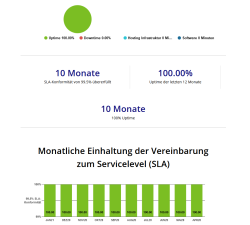
Dragon Medical cloud services provide real-time speech recognition for Dragon Medical One as well as hundreds of partner applications. At Nuance, we recognize the critical role of real-time speech recognition in creating robust clinical documentation and delivering timely, personalized patient care. In order to provide complete transparency, this status page provides historical insight into the overall uptime and SLA compliance of our Dragon Medical cloud services.
Service level agreement (SLA) - Verlaufsseite
Die Dragon Medical Clouddienste bieten Echtzeit-Spracherkennung für Dragon Medical One sowie hunderte Partnerapplikationen. Wir bei Nuance wissen, wie wichtig die Echtzeit-Spracherkennung für das Erstellen von stabiler klinischer Dokumentation und eine pünktliche, individuelle Patientenbetreuung ist. Um vollständige Transparenz gewährleisten zu können, führt diese Statusseite historische Daten zur generellen Verfügbarkeit und der SLA-Compliance Ihrer Dragon Medical Clouddienste an.
Technical support
Technical support from the Nuance Healthcare Solutions Support Center is provided during the term of the Service Agreement. An authorized contact (registration required) should submit an online support case from our Nuance Healthcare Support Platform web page.
Telephone support is recommended for emergency assistance (24x7) and follow-up or escalation of existing support cases created through our Nuance Healthcare Support Platform web page.
No on-site service is available for this product.
Web-based support
Registered Nuance Healthcare Support Platform customers have access to Knowledge Base solutions, plus the ability to submit support cases online. The average response time for web-based support cases is four (4) hours during normal business hours (Monday to Friday 9:00 to 17:00 CET).
- Log in to https://nuance.my.site.com/NuanceHealthcareSupport/ with your Nuance Healthcare Support Platform user ID and password.
- On the home page, click Log a case.
- In the Log a case drop-down menu, select Contact International Support.
- On the Contact International Support page, fill in the required fields and click Confirm.
- For future reference, make a note of the case number displayed.
Telephone support
Telephone support is recommended for emergency assistance (24x7) and follow-up or escalation of existing support cases created through our Nuance Healthcare Support Platform web page.
- Call the Nuance Healthcare Solutions Support Center at +49 241 887 1100
- Your call will be answered by the next available support engineer. Depending on the time of your call and outside business hours, there might not be a German-speaking support engineer available; in this case your call will be answered in English.
- If you are following up on an existing support case, provide your support case number to the support engineer.
- If this is a new support case, have your customer account number ready; the support engineer will verify your customer, authorized contact and contract information and will open a new support case.
The Nuance Healthcare Solutions Support Center will provide product support to authorized contacts of Dragon Medical One customers during the term of the Service Agreement. The customer is responsible for registering, through our Nuance Healthcare Support Platform web page, two (2) trained authorized contacts per customer site, who may contact the Nuance Healthcare Solutions Support Center for technical support on Dragon Medical One.
The trained authorized contacts are defined as customer personnel possessing a reasonable level of operational competency with Dragon Medical One. This can be accomplished through a review of Dragon Medical One product documentation or hands-on product experience. A customer site is defined as any physical location or organizational entity that requires separate administration within the customer's environment.
Registered Nuance Healthcare Support Platform customers have access to Knowledge Base solutions, plus the ability to submit support cases online.
Registering authorized contacts
To register an authorized contact please email support.healthcare@nuance.com to have your Nuance Healthcare Support Platform account activated.
You will need to provide the following information in the email request:
Subject line: Nuance Healthcare Support Platform - account registration request
Email body:
- Your Company Name
- Oracle Customer Account Number: Enter the number provided in your Dragon Medical One Welcome Kit.
- Product Name: Enter Dragon Medical One.
- Contact Information: Enter the name, phone number and email address of each authorized contact to be registered.
When your account is activated, you will receive an email containing your Nuance Healthcare Support Platform account credentials. You can then log on to your account and take advantage of the site features. Approvals may require up to one (1) business day to process. If immediate support is needed during the approval process, please use the telephone support procedure.
Technischer Support
Das Nuance Healthcare Solutions Support Center leistet technischen Support im Rahmen eines Service-Agreements und der darin enthaltenen Bedingungen. Online-Supportfälle sollten von einem autorisierten Kontakt (Registrierung erforderlich) über die Webseite unserer Nuance Healthcare Support Platform gemeldet werden.
Telefonischer Support wird für Hilfe in Notfällen (24x7) empfohlen, ebenso für Follow-ups oder Eskalationen für bestehende Supportfälle, die über die Webseite unserer Nuance Healthcare Support Platform gemeldet wurden.
Für dieses Produkt ist kein Vor-Ort-Support verfügbar.
Webbasierter Support
Registrierte Kunden der Nuance Healthcare Support Platform haben Zugriff auf Knowledge-Base-Lösungen; darüber hinaus können Sie Supportfälle online melden. Die durchschnittliche Reaktionszeit für webbasierte Supportfälle beträgt vier (4) Stunden während der Geschäftszeiten (Montag bis Freitag von 9:00 bis 17:00 Uhr MEZ).
- Melden Sie sich bei https://nuancecommunity.force.com/NuanceHealthcareSupport mit Ihrer Benutzer-ID und Ihrem Kennwort für die Nuance Healthcare Support Platform an.
- Auf der Startseite klicken Sie Log a case.
- Im Dropdownmenü Log a case wählen Sie Contact International Support aus.
- Auf der Seite Contact International Support füllen Sie alle erforderlichen Felder aus und klicken Sie Confirm.
- Notieren Sie sich die angezeigte Fallnummer zur späteren Verwendung.
Telefonischer Support
Telefonischer Support wird für die Hilfe in Notfällen (24x7) empfohlen, ebenso wie für Follow-ups oder Eskalationen für bestehende Supportfälle, die über die Webseite der Nuance Healthcare Support Platform gemeldet wurden.
- Rufen Sie das Nuance Healthcare Solutions Support Center unter +49 241 887 1100 an.
- Ihr Anruf wird vom nächsten verfügbaren Support Engineer entgegengenommen. Abhängig von der Uhrzeit Ihres Anrufs bzw. den Geschäftszeiten ist möglicherweise kein Deutsch sprechender Support Engineer verfügbar; in diesem Fall erfolgt die Beantwortung in englischer Sprache.
- Wenn es sich um einen Follow-up für einen bereits gemeldeten Supportfall handelt, nennen Sie dem Support Engineer Ihre Fallnummer.
- Bei einem neuen Supportfall halten Sie die Nummer Ihres Kundenkontos bereit; der Support Engineer überprüft die Kundeninformationen, die Angaben zum autorisierten Kontakt sowie die Vertragsinformationen und öffnet einen neuen Supportfall.
Das Nuance Healthcare Solutions Support Center bietet Produktsupport für von Dragon Medical OneKunden autorisierte Kontakte im Rahmen eines Service-Agreements und der darin enthaltenen Bestimmungen. Voraussetzung ist, dass der Kunde über die Webseite unserer Nuance Healthcare Support Platform zwei (2) trainierte autorisierte Kontakte pro Kundenstandort registriert; diese sind in Folge berechtigt, das Nuance Healthcare Solutions Support Center zu kontaktieren und technischen Support für Dragon Medical One anzufordern.
Als trainierte autorisierte Kontakte gelten Mitarbeiter im Unternehmen des Kunden, die über angemessene Sachkenntnis im Umgang mit Dragon Medical One verfügen. Diese kann durch eingehende Beschäftigung mit der Produktdokumentation zu Dragon Medical One oder praktische Erfahrung mit dem Produkt erreicht werden. Als Kundenstandort gilt jeder physische Standort bzw. jede organisatorische Einheit, für den oder die in der Kundenumgebung eine eigene Administration erforderlich ist.
Registrierte Kunden der Nuance Healthcare Support Platform haben Zugriff auf Knowledge-Base-Lösungen; darüber hinaus können Sie Supportfälle online melden.
Autorisierte Kontakte registrieren
Um einen autorisierten Kontakt zu registrieren, senden Sie bitte eine E-Mail an support.healthcare@nuance.com, damit Ihr Konto für die Nuance Healthcare Support Platform aktiviert werden kann.
In dieser E-Mail müssen Sie folgende Angaben machen:
Betreffzeile: Nuance Healthcare Support Platform - Kontoregistrierung
E-Mail-Body:
- Name Ihres Unternehmens
- Kundennummer für das Oracle-Konto: Geben Sie die Nummer ein, die Sie als Teil des Dragon Medical One Welcome Kit erhalten haben.
- Produktname: Geben Sie Dragon Medical One ein.
- Kontaktinformationen: Geben Sie den Namen, die Telefonnummer und E-Mail-Adresse der autorisierten Kontakte ein, die registriert werden sollen.
Nachdem Ihr Konto aktiviert wurde, erhalten Sie eine E-Mail mit den Anmeldeinformationen für Ihr Konto bei der Nuance Healthcare Support Platform. Sie können sich bei Ihrem Konto anmelden und die Funktionen der Seite nutzen. Für die Verarbeitung der Genehmigungen wird bis zu ein (1) Arbeitstag benötigt. Wenn Sie schon während des Genehmigungsvorgangs Support benötigen, nutzen Sie bitte unseren telefonischen Support.